
Dockmarchy
Docker and Podman container status in the Omarchy bar.
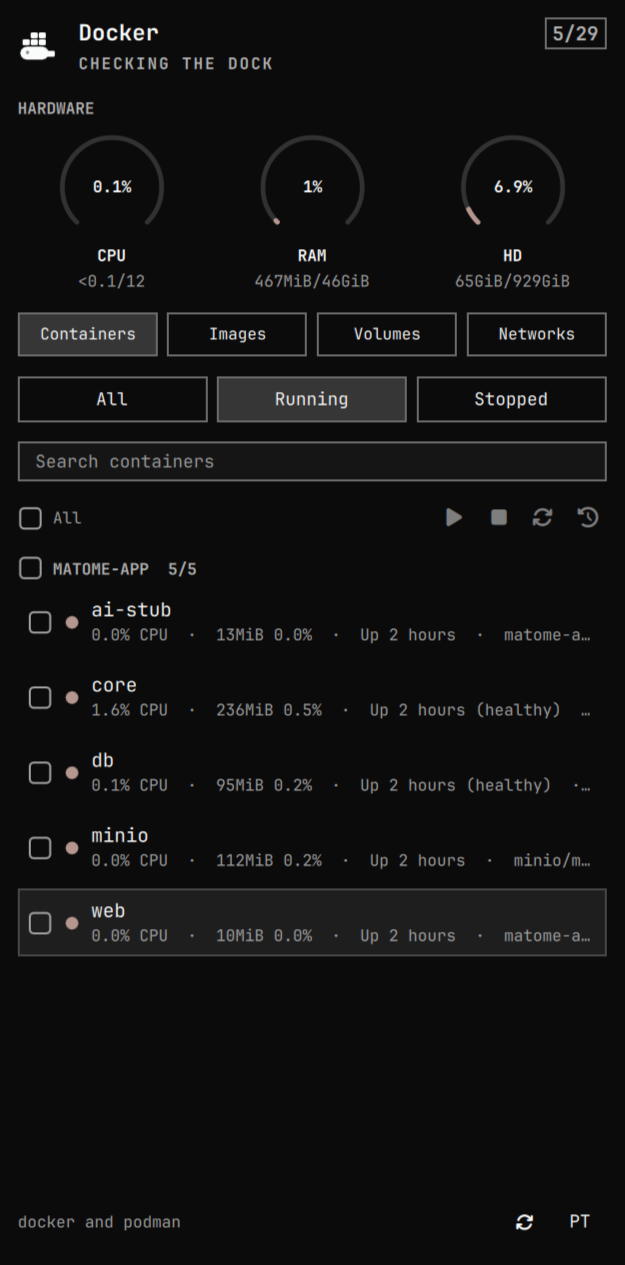
The bar widget is the engine logo. The panel lists containers, images, volumes, and networks. Containers are grouped by compose project, with hardware usage, search, bulk start/stop/restart, and logs. The other tabs list engine resources and can remove selected items.
Install
omarchy plugin add https://github.com/This-Is-NPC/dockmarchy.git --enable
Requires Docker and/or Podman
on PATH. No sudo or pkexec. The plugin runs as your user inside
omarchy-shell and calls the engine CLIs (ps, stats, start/stop/restart,
remove, logs).
Usage
Click the logo to open or close the panel. Press Escape to close it.
The widget is the Docker whale or the Podman seal, depending on which engine answered. Hover shows the running count; after the panel has opened once, it also includes last-seen CPU, RAM, and disk. It turns urgent when something running is unhealthy, restarting, paused, or dead. Right-click refreshes; middle-click opens logs for the first visible container.
Hardware is three small gauges — CPU, RAM, and disk — against the
machine totals, for example 12GiB/46GiB. Disk is the Docker/Podman
footprint (docker system df) against the root filesystem.
Containers are grouped by compose project. Filter by all / running /
stopped, then search by name, service, project, or image. Check rows (or
a whole compose group) and use the command bar to start, stop, restart,
or open logs. Logs open a new terminal per selected container on the
active workspace. Running containers follow with -f; stopped containers
show history and keep the window open.
Switch the top chips to Images, Volumes, or Networks. Those lists group
the same way (compose project, or repository for images). Select rows and
Remove from the command bar. Default networks (bridge, host, none)
are listed but not removed. Docker refuses a delete when the resource is
still in use; the panel shows that error.
Language defaults to English. Switch to Portuguese from the footer.
| Action | Mouse | Keyboard |
|---|---|---|
| Open / close | Click the logo | Esc closes |
| Refresh | Right-click the logo, or the refresh icon | r |
| Filter | The three chips | 1 2 3 |
| Kind | Containers / Images / Volumes / Networks | c i v n |
| Search | The search field | / |
| Select | Checkbox or row | Space, a for all visible |
| Start / stop | Command bar | s, x |
| Restart | Command bar | t |
| Logs | Command bar | l |
| Remove | Command bar (images, volumes, networks) | d |
| Language | PT / EN |
— |
| Move | Hover | arrows or hjkl |
Engine detection is automatic: Docker if the CLI is there, Podman if it is,
both when both answer. Force one in the widget settings (Auto / Docker /
Podman). Refresh interval defaults to 15 seconds. While the panel is
closed, only the container list is polled so the bar stays cheap;
hardware gauges and images/volumes/networks load when you open the panel.
Configure
omarchy bar move io.github.this-is-npc.dockmarchy --section right
Remove
omarchy plugin remove io.github.this-is-npc.dockmarchy
Development
node test/model-test.js     # parser, compose labels, grouping, i18n
omarchy plugin validate .   # manifest against the shell's schema
Model.js has no Qt in it, so the list engine runs in node. Panel.qml
only paints state.
While hacking on this checkout, copy it into the user plugin directory (the shell refuses a symlink there):
rsync -a --delete --exclude .git --exclude test \
  ./ ~/.config/omarchy/plugins/io.github.this-is-npc.dockmarchy/
omarchy-shell shell rescanPlugins
omarchy plugin enable io.github.this-is-npc.dockmarchy --section right
MIT. See LICENSE.